


Rocksmith+ Fast Music Learning
3.2237.00 Reviews
App Specs
- Version
- 2.9.0
- Updated On
- License
- Free
- Downloads
- 100,000+
- Developer
- Ubisoft Entertainment
- Categories
- Music & Audio
- Platform
- Android
Screenshots


 Analysis by AppCompare
I like the idea of a music lesson that can fit around the rest of the household: one person can practise a guitar part while someone else is cooking, studying or winding down nearby. That makes Rocksmith+ Fast Music Learning most appealing when a learner already has an instrument at home and wants a guided reason to pick it up regularly, rather than another video to watch passively. It is a Music & Audio app from Ubisoft Entertainment, and its focus on playing along makes it feel different from a general music-theory course.
When a shared instrument becomes a shared routine
In a home where several people use the same guitar or bass, the app can give each player a simple structure: choose a practice window, work on a part, then leave the instrument ready for the next person. I would keep a small note beside the instrument with the song or section each person wants to revisit. That is a low-tech way to avoid spending a shared session deciding what to play, and it does not depend on everyone having the same level of experience.
There is a useful distinction between sharing an instrument and sharing a learning account. I would not assume that progress, preferences or practice history stay neatly separated for different household members. If two people take turns on one device, it is worth checking what the app shows after each person opens it and agreeing on a routine before treating it as a multi-learner setup. A dedicated device or separate account arrangements may be more comfortable for people who want clearly individual practice, but that choice depends on the household and how the service is used.
Make practice easier to coordinate
A realistic routine might be a short turn after dinner: one player works through a difficult passage at a slower pace, while another uses the remaining time to revisit a familiar part. The practical advantage is not that every session needs to be long; it is that the interactive format gives a player something specific to do once the instrument is in hand. I would decide the session’s aim before opening the app—such as improving a transition or keeping a steady rhythm—so browsing does not take over the time meant for playing.
For shared spaces, headphones can help keep practice from competing with conversation or television, but they are not a cure-all. A learner still needs to hear their instrument clearly enough to judge timing and tone, and the household may need to agree on volume and quiet hours. If the room is busy or someone needs silence, a conventional lesson that can be read away from the instrument may be the better choice for that moment.
Age, expectations and household trust
The app is rated Teen, so I would treat it as something for a teenager to explore with the same sensible conversation I would have about any music service: what they plan to practise, when they will use the device, and whether purchases need an adult’s approval. It is free to download, but that does not mean every part of the experience is free. The listed in-app purchases range from $19.99 to $139.99 per item, so I would check the purchase screen carefully and set household expectations before a younger player starts exploring.
I would also avoid promising a child or teen that the app automatically creates a private, separate learning space for each person. If a device is shared, agree on who can make purchases and how practice turns work. Those small boundaries matter more than a grand plan to practise every day; a routine that feels fair is easier to keep than one that turns the instrument into a source of arguments.
Worth Reading Before You Choose

Flipboard Shows What News Apps Must Do Beyond the Feed

Switching to Android Auto Means Rethinking Your Driving Routine

Google Calendar Makes a Crowded Week Easier to Manage

Ludo King Makes the Most of the Minutes Between Plans

Baby Panda World Brings Quick Play to Modern Phones, but Its Game Library Feels Busy

ESPN’s Live Game View Makes Following Close Games Easier
Getting Started with Rocksmith+ Fast Music Learning
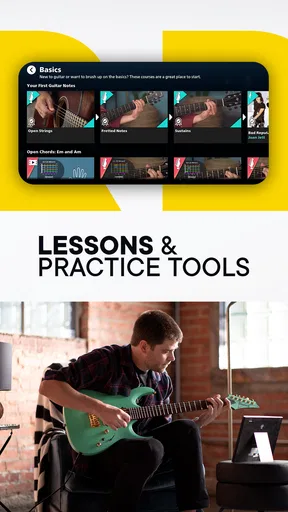
First things first, downloading and setting up Rocksmith+ Fast Music Learning is a breeze. Available on both Android and iOS, it's as easy as tapping a button and you're ready to roll. Once installed, the app greets you with a sleek and user-friendly interface. It's like the developers knew exactly what we needed to stay motivated and engaged.
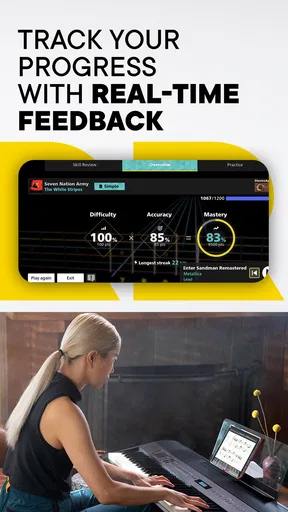
The initial setup includes selecting your instrument of choice—be it guitar or bass—and you're guided through a quick calibration process to ensure everything's in tune. This is where the magic begins. The app uses real-time feedback to help you learn at your own pace, which is pretty revolutionary compared to traditional methods.
The Learning Experience
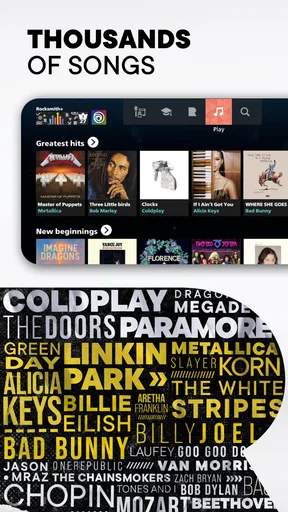
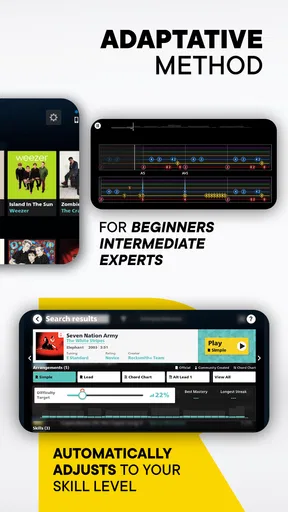
Diving into the lessons, I was pleasantly surprised by the variety of songs available. From classic rock to modern hits, there's something for everyone. The app categorizes lessons based on skill level, so whether you're a newbie or a seasoned player, there's a place for you here.
One feature I absolutely love is the interactive tabs. As you play along, the app listens and provides feedback, highlighting notes you're nailing and those you might need to work on. It's almost like having a personal tutor right in your pocket! Plus, you can slow down tricky sections, which is perfect for practicing those pesky solos.
Learning habits that make the feedback useful
Real-time feedback is most helpful when I treat it as a prompt to investigate, not as a final verdict on whether I can play. If a passage keeps flagging errors, I would first check whether the instrument is in tune and whether the room is quiet enough for the app to hear clearly. Then I would slow the section down, focus on one transition, and bring the tempo back up only when my hands feel comfortable. That workflow turns a score or highlighted note into a practical next step instead of a reason to repeat the whole song from the beginning.
It also helps to separate “I can follow the screen” from “I can play the part without relying on the screen.” Tabs are valuable for seeing what comes next, but looking up constantly can interrupt posture and timing. After a few passes, I would try a short stretch with less attention on the display, then return to it to check the troublesome change. That small alternation makes the app a guide rather than a crutch.
For a beginner, the strongest use is building familiarity with the instrument through manageable song sections. Someone who already plays may get more from using the feedback to spot weak transitions or practise a passage they have avoided. It is less suited to a learner whose main goal is formal theory, sight-reading or a structured explanation of harmony; for those needs, a dedicated lesson course or an in-person teacher can provide context that playing along alone may not.
Song discovery, subscriptions and alternatives
The song library is part of the appeal, but it is also where expectations matter. I would browse for music I genuinely want to practise before committing to a paid plan, rather than assuming that a large catalog automatically includes every artist or track on my personal wish list. The app is free to install, and in-app purchases are listed from $19.99 to $139.99 per item; I would review the available purchase terms in the app and decide whether the catalog suits my tastes before spending.
Compared with a video lesson, this approach asks me to play and respond rather than simply watch someone demonstrate a technique. Compared with a metronome or tuner, it offers a more engaging practice path, though those simpler tools can be quicker when I only need to check pitch or keep time. A private instructor remains the better option for detailed hand-position corrections or a personal learning plan. I see this app as most useful between lessons, or for people who want song-based practice without arranging a weekly appointment.
There is a practical trade-off in that interactive listening depends on the phone or tablet being placed where it can follow the instrument. Before a longer session, I would settle the device on a stable surface, check that the screen is easy to see from a comfortable playing position and avoid shifting it around mid-song. If the setup makes me twist my neck or strain to read, the convenience quickly disappears. A few seconds spent arranging the room can make a practice session more comfortable and keep attention on the instrument.
Stay Motivated
Learning an instrument can sometimes feel like a daunting task, but Rocksmith+ Fast Music Learning keeps things fresh with its gamified elements. The app includes daily challenges and achievements to unlock, which adds an extra layer of motivation. I found myself coming back daily just to beat my previous scores and unlock new songs.
Another neat feature is the community aspect. You can connect with other users, share your progress, and even partake in friendly competitions. It's a great way to stay inspired and see how others are progressing on their musical journey.
Motivation without turning practice into a contest
Challenges can give a hesitant player a reason to pick up the instrument, but I would use them as a nudge rather than the measure of success. A score can make repetition feel satisfying, yet musical progress also includes cleaner transitions, steadier timing and being able to recover after a mistake. For a household with different skill levels, comparing personal improvement is kinder and more useful than comparing one person’s score with another’s.
The social side may suit a learner who enjoys sharing progress, but it is not essential to getting value from the lessons. Someone who prefers to practise privately can focus on the song work and ignore community participation. If social features are part of a teenager’s use, I would talk through what they are comfortable sharing and keep the same boundaries they would use on other online services, rather than assuming that a music-focused community needs no thought.
Technical Aspects
Now, let's talk about the technical side. The app runs smoothly on both platforms, and I didn't encounter any crashes or bugs during my time with it. The developers seem to be on top of updates and improvements, which is always a reassuring sign.
One thing to note is the subscription model, which might not be everyone's cup of tea. However, considering the vast library and the comprehensive learning tools provided, it feels like a worthwhile investment for anyone serious about mastering their instrument.
Compatibility and choosing a sensible commitment
The current version is 2.9.0, and the minimum operating-system requirement is 8.1. I would check that an older device meets that requirement before making it the household practice screen, especially if it is a spare phone or tablet that rarely gets updated. A compatible device is only part of a comfortable setup, though: the screen should remain visible while playing, and the instrument should be in a place where using the app does not disrupt everyone else.
Rocksmith+ is free to download, but ongoing access may involve in-app purchases, so I would not treat installation as a commitment-free trial of every lesson or song. The average rating is 3.4 from around 1,800 ratings, with about 232 written reviews. I read that as a reason to match the app to my own needs rather than expect universal satisfaction: a player who enjoys guided, song-based practice may value it differently from someone looking for a completely free course or a traditional teacher.
It has been available since June 8, 2023, and has over 100,000 installs. Those figures suggest an established audience, but they do not tell me whether its learning style will suit a particular player. The useful test is more personal: can I find material I want to play, does the feedback help me adjust, and does the purchase model fit how often I expect to practise? If any of those answers is no, a free video lesson, a basic practice tool or a teacher may be a better match.
Final Thoughts
All in all, Rocksmith+ Fast Music Learning is a game-changer for anyone looking to learn guitar or bass. Its combination of real-time feedback, a massive song library, and a supportive community makes it a standout choice among music learning apps. If you're ready to take your musical skills to the next level, I highly recommend giving it a try.
So, what are you waiting for? Grab your instrument, download the app, and start rocking out! Trust me, your future self will thank you.
My household verdict
For a shared home, I would recommend it when at least one person is genuinely keen to practise guitar or bass, the device can be set up comfortably, and everyone understands how purchases and turns will work. The strongest case is a learner who wants songs to make practice feel purposeful and who is happy to repeat small sections until they improve. It is a less convincing choice for a household seeking a no-cost, fully separate learning experience for several people, or for someone who wants piano instruction as their central goal; the store summary mentions piano, but I would not choose it on that promise alone without first checking that the current experience meets that need.
My simplest advice is to start with a realistic routine rather than a big promise: choose one player, one instrument and a short practice window, then see whether the feedback and song selection make that person want to return. If they do, the app can become a useful part of the household’s music corner. If they do not, a different learning format is likely to serve them better, and there is no need to force a subscription or a practice habit that does not fit.
Pros
- Interactive lessons enhance learning.
- Wide range of songs to practice with.
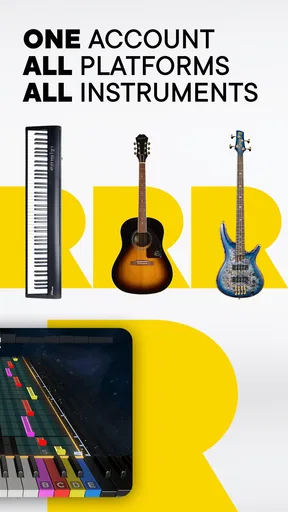
- Supports multiple instruments.
- Real-time feedback on playing.
- Customizable learning pace.
Cons
- Requires a subscription to access content.
- Initial setup can be complex.
- Limited offline functionality.
- Occasional app crashes reported.
- High data usage for streaming.
FAQs for Rocksmith+ Fast Music Learning
What is Rocksmith+ and how does it help in learning music?
Rocksmith+ is an interactive music learning app designed to help users learn guitar and bass. It offers real-time feedback as you play along with a vast library of songs. The app adapts to your skill level, making it suitable for beginners and advanced players alike. It uses a unique connection method to ensure minimal latency while playing.
Is Rocksmith+ suitable for beginners?
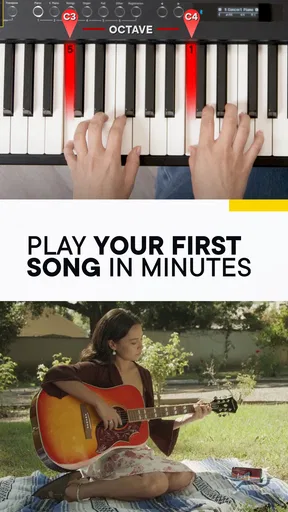
Yes, Rocksmith+ is designed to cater to all skill levels, including complete beginners. The app offers step-by-step lessons, tutorials, and adaptive difficulty levels. This ensures that new players can gradually build their skills while enjoying the learning process. The user-friendly interface and clear instructions make it accessible for anyone starting their musical journey.
What type of equipment do I need to use Rocksmith+?
To use Rocksmith+, you'll need a compatible guitar or bass, a Real Tone Cable or similar audio interface, and a device with the app installed. The Real Tone Cable connects your instrument to your computer, console, or mobile device. Some users also prefer using an audio interface for better sound quality and reduced latency.
Can I access Rocksmith+ on multiple devices?
Yes, Rocksmith+ offers cross-platform access, allowing you to use the app on various devices such as PCs, consoles, and mobile devices. Your progress is synced across all platforms, so you can continue learning wherever you are. Just ensure that each device meets the app's system requirements for optimal performance.
Does Rocksmith+ require a subscription, and what are the costs involved?
Rocksmith+ operates on a subscription model with various pricing tiers depending on the length of the subscription. Typically, monthly, quarterly, and annual plans are available, each offering access to the full song library and learning tools. Prices may vary based on regional availability and promotions, so check the official website for the most current information.


